ResearchDesign & digital habits
Where digital experiences give us a stopping point.
A chapter ends. A queue runs out. A feed offers something else. The useful question is: what, exactly, is finished?
Done with this.
What happens next?
This chapter ends.
There may be another.
The last item ends.
This set is complete.
You have what you need.
You can be done before the content is.
A visible ending tells you where you are. The next action is a separate design choice.
Imagine opening a guide to find one answer. You might reach the answer halfway down the page. The page still has more words, but your task is complete. Now imagine finishing a video just as the next one starts: the item ended, while the viewing sequence continued.
“Done” is doing several jobs here. Separating them gives readers a way to understand an interface—and gives designers a way to make its boundaries clearer.
01 / TWO QUESTIONS, FOUR COMBINATIONS
Does it end? Who starts the next item?
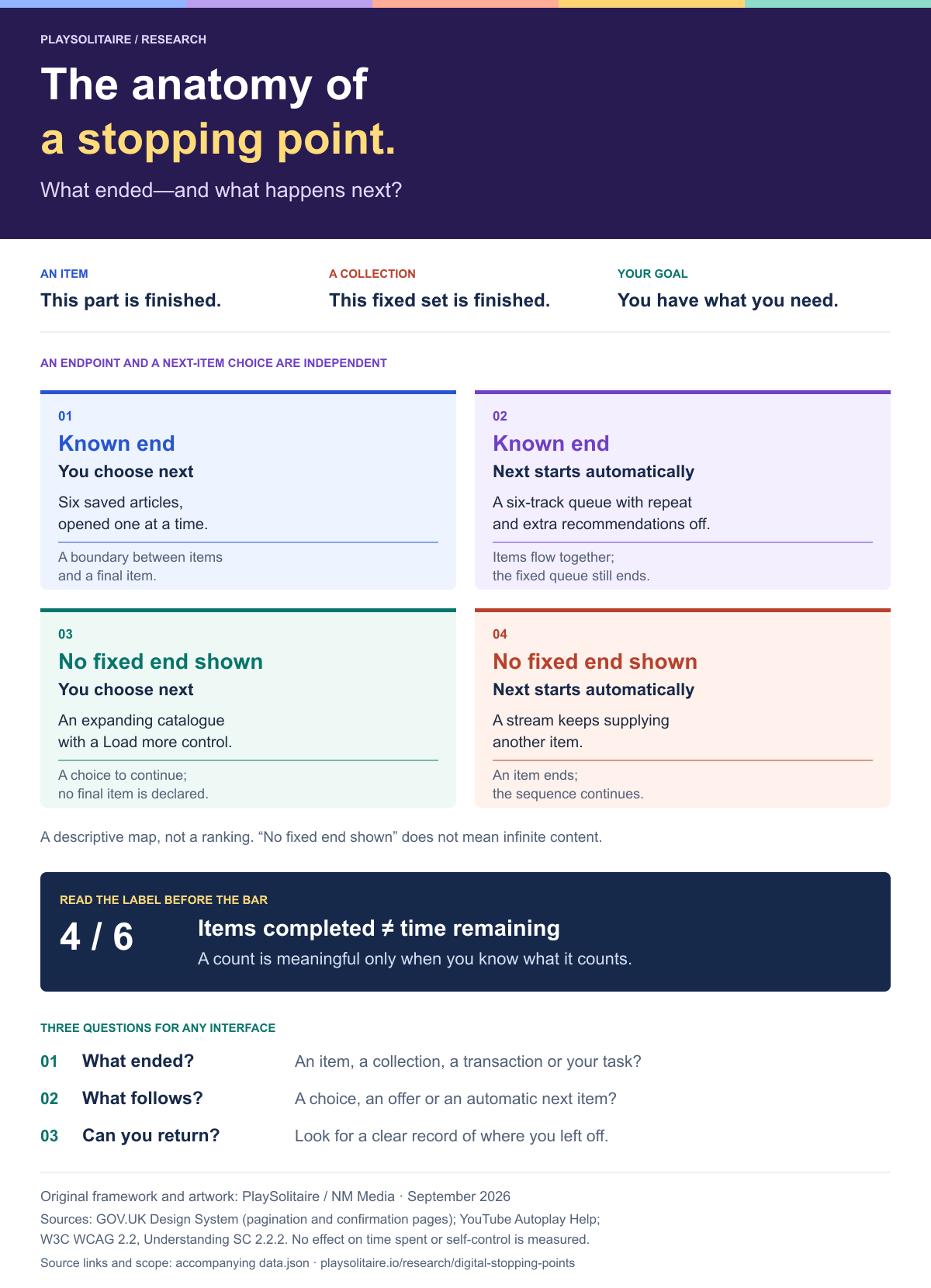
A collection can have a known final item while moving between items automatically. Or it can ask for a fresh action each time without showing a final item at all. These are independent properties.
An endpoint and a transition are different things
Four schematic cases. Read each card as a combination, not a ranking.
Known end
You choose nextSix saved articles, opened one at a time.
A boundary between items and a final item.Known end
Next starts automaticallyA six-track queue, with repeat and extra recommendations off.
Items can flow together even though the queue has an end.No fixed end shown
You choose nextAn expanding catalogue with a Load more control.
A choice to continue without a promise of reaching the last item.No fixed end shown
Next starts automaticallyA stream that keeps supplying another item.
A finished item is followed by another; the collection has no declared finish.A next-page link is a boundary, not a finish line
GOV.UK’s pagination guidance separates long content into navigable pages when that helps performance or usability. It also warns that automatically loading more content near the page bottom can create problems for keyboard users. Neither pattern tells you whether you have already found the answer you came for.
A finished video can lead straight into another
YouTube’s Autoplay documentation describes another related video playing after the current one ends when Autoplay is on. It also explains how to switch the feature off or cancel the next video. The end of a video and the decision to continue are distinct parts of the interface.
02 / CHANGE ONE RULE AT A TIME
Try the same six items with different boundaries
Keep the sample items the same. Change whether the collection has a declared end, then change who initiates the next item. Watch what the completion message can honestly say.
What happens after “finished”?
Changing a setting restarts the sample. All steps are triggered by you; “Automatic next” models the transition without playing media or running a timer.
- 1Current
- 2Unread
- 3Unread
- 4Unread
- 5Unread
- 6Unread
These six items are the whole collection in this case.
Item 1 is open
Finish it to see the boundary before item 2.
The model exposes two different messages: “this item is complete” and “this collection is complete.” Requiring a next action changes the transition. Declaring a final item changes the endpoint. Neither, by itself, tells us how long a person will use a real service.
03 / THE GOAL DEFINES COMPLETION
Progress, empty space and success can disagree
Four of six tells you how much—not how long
An invented six-item reading list, with four items marked complete.
Items completedNot time remaining. Not proof that the reader’s question has been answered.
An upload reaching its end might mean that a file arrived, not that a request was approved. GOV.UK’s confirmation-page pattern calls for a clear completion message and an explanation of what happens next. Its application example still allows a later response asking for more information. The message needs to name the transaction that actually finished.
A small rules comparison makes the distinction concrete
Games are useful examples because their win conditions are explicit. These three cases describe the rules on this site; they do not suggest how long a session will take.
In Spider Solitaire, removing one complete same-suit King-to-Ace run finishes a subgoal. Removing all eight completes the game. Seven runs is progress toward the win condition; it is not the same state as eight.
In Forty Thieves Solitaire, an empty stock means no more cards can be drawn. It does not, on its own, mean the deal is won or that no moves remain. Winning requires all 104 cards to reach the foundations; the tableau and waste still matter after the last draw.
Pyramid Solitaire provides the reverse example: clearing the pyramid wins the game even if cards remain in the stock or waste. The goal is specific. “Everything on screen must disappear” would be a different rule.
For a reader, viewer or player, choosing to stop is a further possibility. A personal stopping point does not need to be a software-defined completion event.
04 / A QUICK INTERFACE REVIEW
Look for a boundary you can name
Name what ended
An item, a batch, a transaction, or the task you came to do?
Look at what follows
Does the interface wait for a choice, offer another item, or start it?
Find your way back
Can you identify where you left off if you decide to return?
For designers, make completion messages specific, distinguish optional next steps from required ones, and preserve a clear route back to unfinished work. These are editorial review prompts, not a score for whether a product is “good” or “bad.”
A stopping point is most useful when its meaning is clear. “That part is finished,” “there is no more in this set,” and “you have achieved the goal” are three messages worth keeping distinct.
Sources and scope
This is an interface-design explainer based on primary product documentation, design guidance and verified game rules. The diagrams, four-case framework and interactive model are original teaching material, not measured effects on behavior.
- YouTube Help: Autoplay videos
- GOV.UK Design System: Pagination
- GOV.UK Design System: Confirmation pages
- W3C: Understanding WCAG 2.2, Pause, Stop, Hide
The product example describes documented behavior, not a measurement of time spent or self-control. The model does not establish that any pattern increases or reduces engagement. Real interfaces can mix patterns, change settings or change the available collection.
Sources and local rules checked September 27, 2026. Full scope notes and the model’s assumptions are included with the downloads.
The anatomy of a stopping point
A visual reference and a short checklist for reading or reviewing an interface.